Stop reporting on the product.
Start managing it.
Customers, feedback, problems, opportunities, projects, roadmaps, competitive intelligence, OKRs, research, meetings, vendors, use cases and decisions - one connected workspace. A living model of your product, not another static snapshot of it.
Your product knowledge already exists.
Stop reconstructing it from tabs.
None of these requests are unusual. But every one triggers the same workflow: search, open tabs, find documents, reconstruct context, create another summary. That feels backwards - because it is.
In the PM app, every entity has relationships. The relationships create context. And that context is available from one workspace the moment you actually need to do something with it.
An OS for doing Product Management - not another tool for reporting that you did it.
- Someone asks for a roadmap updatetoday: build a deck
- Leadership wants to understand an opportunitytoday: pull together the research
- A customer meeting is coming uptoday: dig through previous feedback
- A competitor launches somethingtoday: work out which projects and opportunities it affects
- An OKR review arrivestoday: trace the work back to the objective
- With the PM app: the context is already connected - answer in seconds, not a search session.
Three things no other tool does.
Built because PMs kept asking.
The boring stuff - projects, roadmap, OKRs - is table stakes. These are the surfaces that make the PM app feel like it's working for you.
Raw signal in. Opportunities, solutions and trees out.
Quick-capture feedback from anywhere. AI clusters duplicates into themes, ties them to use cases and accounts, and lets you stand up opportunities, candidate solutions and full discovery trees - each node RICE-scored and promotable into a real project in one click.
- AI clusters duplicate feedback into themes
- Opportunity → Solutions table with per-solution RICE
- Discovery trees: filter, quick-add, promote to project
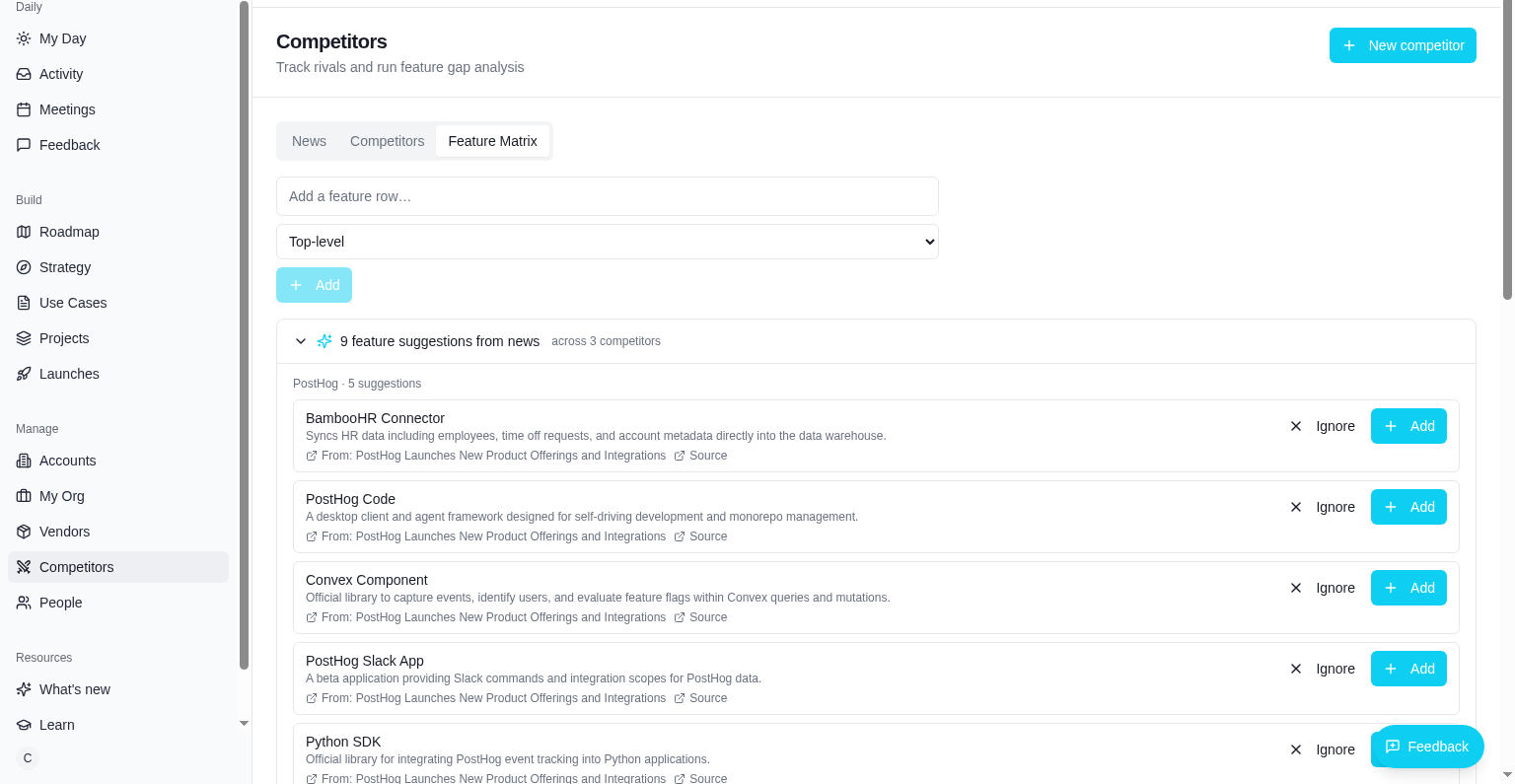
Every competitor move, read for you every morning.
A live news feed pulls launches, funding, hiring and analyst mentions for each competitor you track - topic-filtered, summarised, and linked to your gap matrix. Add UI captures and side-by-side comparisons to see how competitors are actually evolving, not just what their press release says.
- Topic filters: launches, pricing, hiring, funding, analysts
- Nested feature matrix + AI enrichment
- UI captures + side-by-side comparison
Every entity linked. The graph builds itself.
@-mention any project, use case, vendor, account or person from any note or update - bidirectional links appear automatically. Cmd/middle-click anything to peek in the side panel without losing context, or press C anywhere to drop a thought and let AI route it to the right place.
- @mentions everywhere with bidirectional backlinks
- Entity side panel - peek without losing your place
- Quick capture (press C) - AI routes it for you
The epicentre of your PM week.
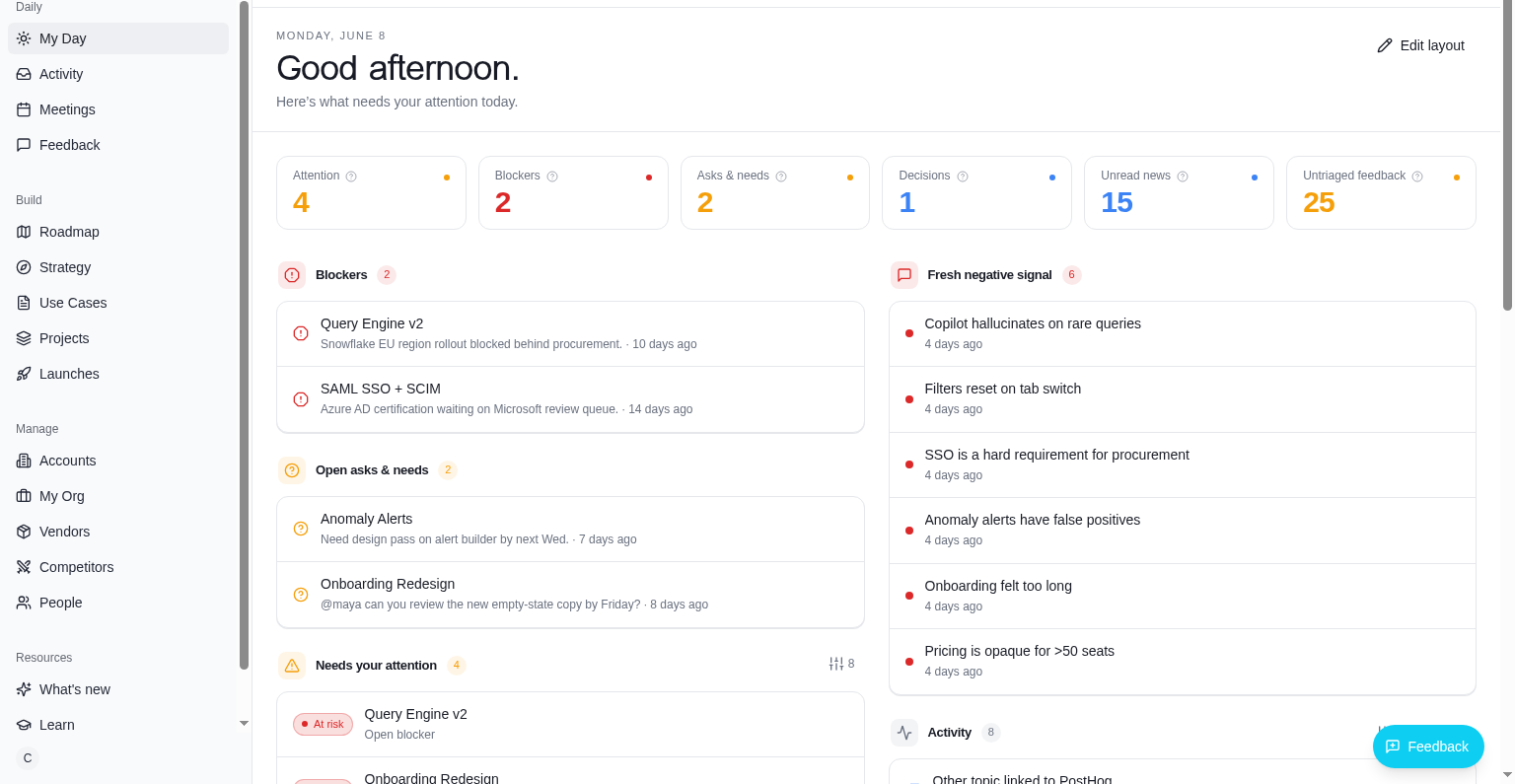
Every morning, My Day shows you exactly what needs your attention - drifting projects, open blockers, unanswered asks, and pending decisions, alongside today's meetings and snoozed items. Drag sections to reorder, click to resize, hide what you don't need.
- Hero stats: Attention, Blockers, Asks & Needs, Decisions - all click-through
- Drag-to-reorder, resize, snooze and hide - your layout, your way
- Every outstanding item across the workspace, surfaced in one calm view
Composable blocks. Real PM frameworks.
Stop pasting RICE into spreadsheets and Backstory into Notion. Build every project brief from purpose-built blocks: RICE calculator, Backstory, Pain Points, User Stories, Acceptance Criteria, Success Metrics, Assumptions, and free-form notes.
- Auto-calculated RICE score - see priority change as you tune inputs
- Block library covers every PM artefact you actually write
- Mention people, link feedback, attach files - all in-line
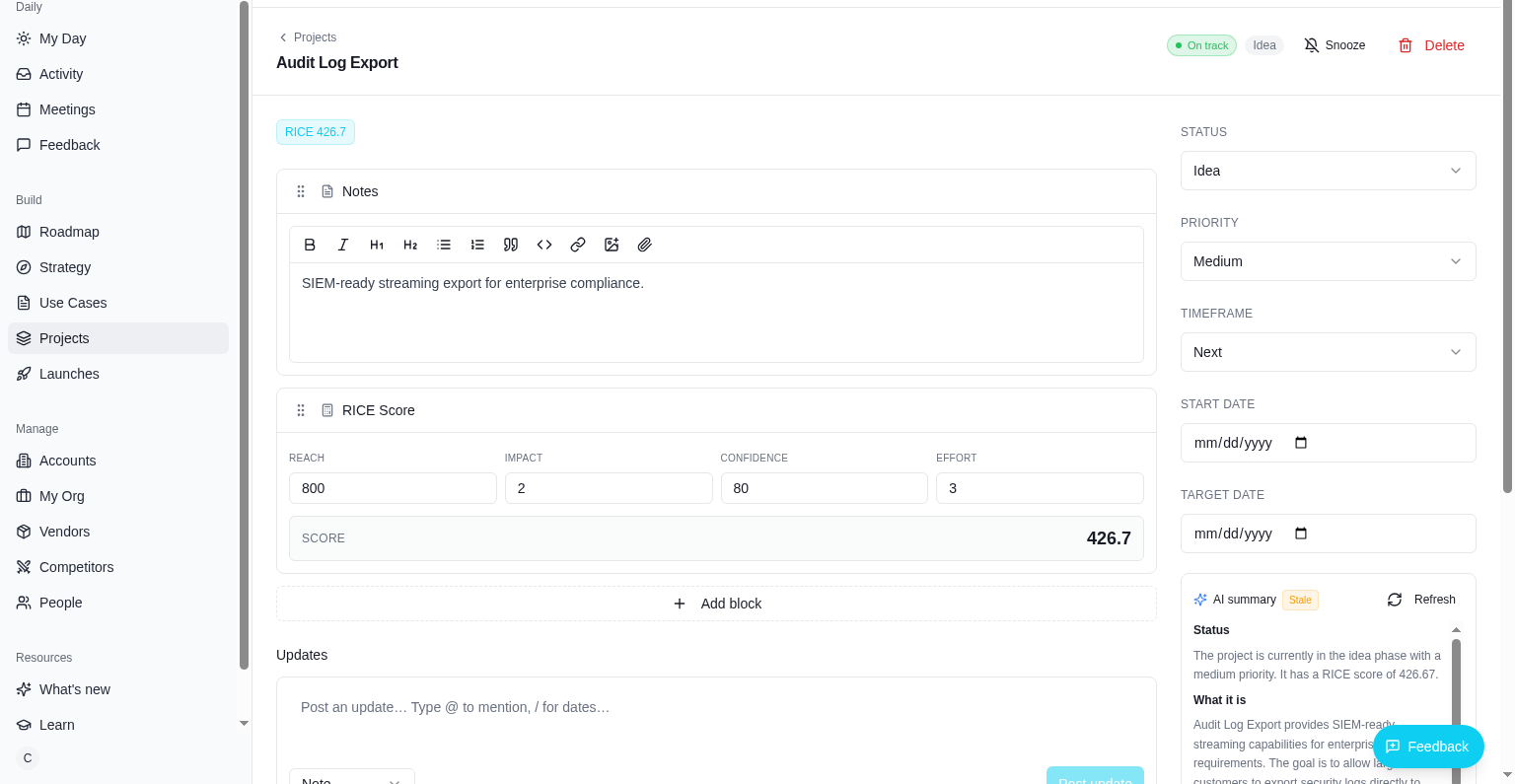
Now / Next / Later, drag to prioritise.
A roadmap your team actually trusts. Drag projects between Now, Next and Later to reprioritise. Health pills, RICE scores, owners and pillars all visible at a glance. Plus a timeline view for quarter-by-quarter planning, and one-click public share links for execs and customers.
- Now / Next / Later board + quarter timeline view
- Drag-to-reorder priority within each column
- Public, password-protected share links
See where you win and lose.
A side-by-side feature matrix against every competitor you track. Break top-level features into sub-features for richer comparisons. AI enrichment auto-fills competitor status and suggests new features and sub-features worth tracking.
- Nested sub-features for granular comparison
- AI enrichment for instant gap analysis
- Linked to your roadmap and feedback - evidence travels with the work
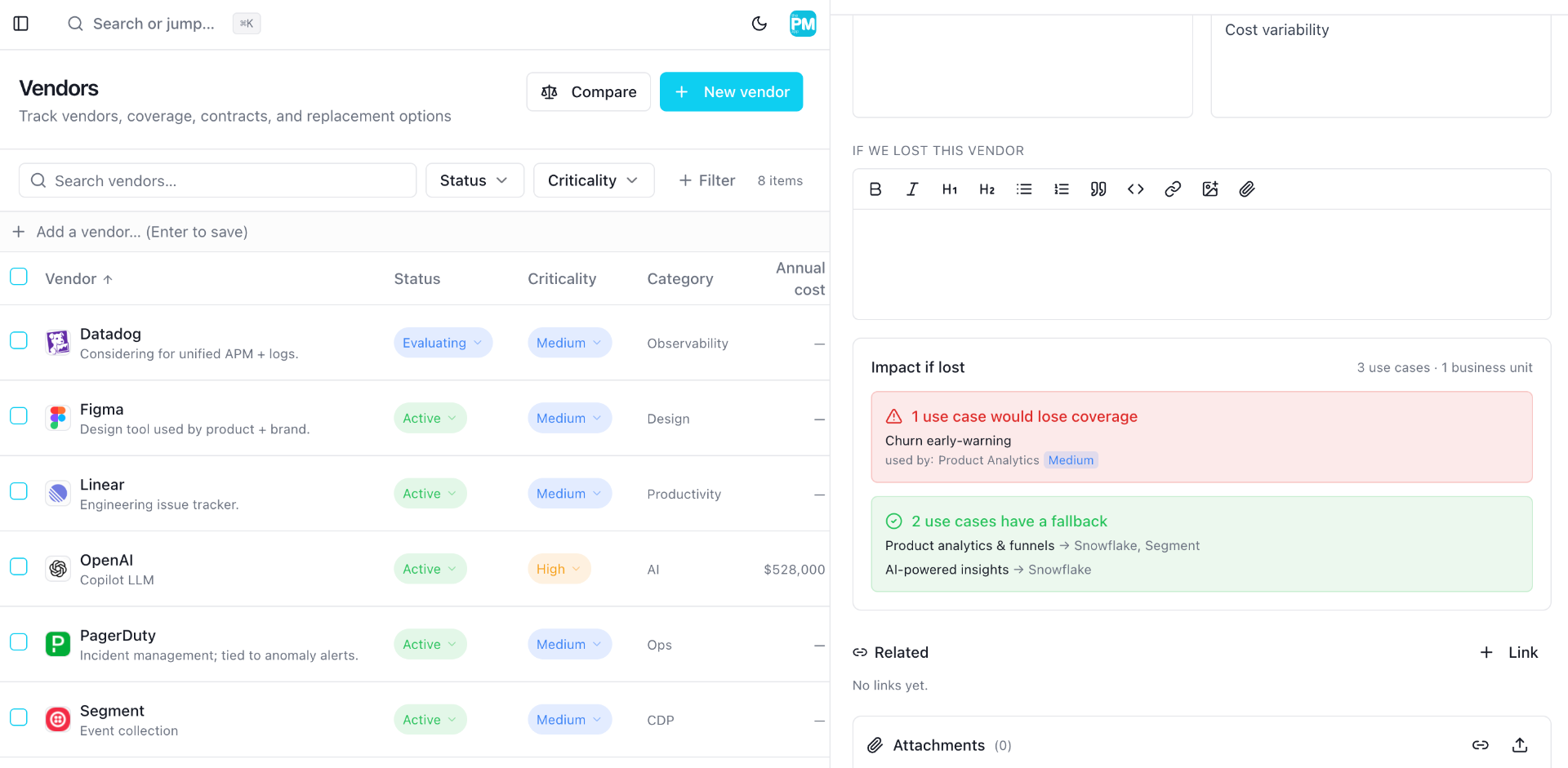
Every tool you pay for, tied to the work it powers.
Most PMs can't answer 'what does this $80k tool actually do for us?' - let alone spot duplicate spend before renewal. the PM app tracks every vendor and every internal use case in one graph, so coverage gaps, overlap and renewal risk are visible months before the invoice lands.
- Vendor register with cost, renewal date, owner and AI-enriched logos
- Use cases link to the vendors, projects, business units and feedback they touch
- Spot overlap and gaps instantly - walk into vendor and budget conversations with the information you need
One workspace.
Every surface a PM touches.
No more bouncing between Jira, Notion, Productboard, Sheets, and Slack. Every surface a Product Manager touches - connected, searchable, and designed to make great decisions the path of least resistance.
My Day
Greeting, hero stats, snooze, drag-to-reorder sections, every outstanding item in one calm view.
Block-based projects
RICE, Backstory, Pain Points, User Stories, Acceptance Criteria, Success Metrics - composable blocks.
Now / Next / Later
Drag to reprioritise. Health pills, RICE, owners - all visible at a glance.
Roadmap timeline
Quarter-by-quarter timeline view. Filter by pillar, owner or status.
Feedback + AI clustering
Capture from anywhere, cluster duplicates, link to use cases and projects.
Competitor matrix
Nested sub-features, side-by-side comparison, AI enrichment.
OKRs + check-ins
Vision → Pillars → Objectives → KRs. Weekly check-ins with confidence.
Meetings
Recurring series, agendas that carry forward, decisions auto-linked.
Vendors & contracts
Cost, renewals, use-case coverage. AI auto-fills logos and websites.
People & stakeholders
Customer accounts, internal contacts, who-cares-about-what graph.
My Org
Business units and internal products grouped, linked to use cases and vendors.
@mentions everywhere
Mention any project, person, vendor, or feedback - the graph builds itself.
Real-time collaboration
Presence avatars, live cursors, field-level edits - see who's where.
Quick capture (press C)
AI routes a thought to feedback, project, or use case - anywhere in the app.
Calendar sync
Two-way Google Calendar and Outlook / O365 sync - meetings, agendas, and attendees.
Opportunity → Solutions
Every opportunity gets a Solutions table with per-solution RICE and inline quick-add.
Discovery trees
Visual opportunity-solution trees with filters, quick-add and promote-to-project.
UI captures & compare
Snapshot competitor UIs, annotate them, and stack two side-by-side for review.
Entity side panel
Cmd/middle-click any entity to peek without losing context. Back-navigate inside the panel, or maximize for the full page.
Partnerships (Build / Partner / Buy)
Track every external company you're evaluating: stance, stage, pillars, @mentions, and a resolve-need dialog.
Visual workflow editor
FigJam-style canvas - drag nodes, connect them, lay out how your team actually works.
Semantic capture search
pgvector-powered search across UI captures - find 'pricing page with three tiers' in plain English.
AI feedback triage, persisted
AI suggests links, sentiment and account matches - saved on the item so you can re-open without re-running.
Resources hub
Help, Learn, and What's New - grouped under Resources with unread badges.
Real-time, everywhere. Like Figma - but for product thinking.
Presence avatars on every detail page. Live edits on every field. @-mention any project, person or vendor in any note and watch the graph build itself.
Simple pricing. One plan.
Start with everything unlocked for 30 days - no credit card. After that, keep going on the Free plan or upgrade to Pro. Your data stays yours, readable and exportable, either way.
Free
Where you land when your trial ends. Enough to keep your morning competitor habit alive.
- 3 tracked competitors with the daily news feed
- 3 projects with block-based briefs
- My Day, roadmap, feedback and strategy - read and write
- One workspace, one member
Pro
or $29 / user / month, billed monthly
- Unlimited competitors, projects, feedback, vendors & meetings
- Unlimited workspace members & roles (admin, editor, commenter, viewer)
- AI feedback triage & clustering, KR suggestions, competitor & vendor enrichment
- Weekly competitor digest email & external product signal
- Two-way Google Calendar & Outlook / O365 sync
- UI Captures with annotations, comparisons & semantic search
- Discovery: Opportunities, Trees, Workflows & Build / Partner / Buy
- Public roadmap share links (password-protected) & priority support
No credit card to start · cancel anytime · billing handled by Paddle